Salesforce is a highly effective Customer Relationship Management (CRM) platform that has revolutionized the way businesses manage relations with their customers and can simplify operations. That’s why most of the biggest and prominent organizations like Toyota, Spotify, Canon, etc trust Salesforce. It allows organizations to connect with customers, optimize sales processes, deliver better customer service, and drive growth.
However, using Salesforce successfully needs extensive planning and execution. A successful Salesforce set up may enhance your company’s efficiency, productivity, and performance in general. In thisSalesforce Implementation guide, we will guide you to the Salesforce implementation process, such as critical factors and best practices to assure a smooth and successful deployment.
What is Salesforce Implementation?
Salesforce Implementation is the direct process of customizing, configuring and deploying the Salesforce platform to meet the required needs of any business. This goes into multiple steps – from business data migration, system testing and user training as well, for ensuring a smooth move towards a new and modern CRM system.
Salesforce helps businesses to boost efficiency, revenue, as well as customer satisfaction rate by organizing customer data, automating operations, and offering important insights and all this is possible when you will understand and go deep into this Salesforce implementation guide
Why is Salesforce Implementation Right for Your Business? Key Benefits
The Salesforce implementation can be a great option for you and make your business go to the next level. Let’s look at why it’s right for you:
Enhanced Customer Relationship Management:
Salesforce provides a single system to handle client contacts, tracking opportunities, and improving customer satisfaction. Salesforce lets businesses gain a full picture of their consumers through the integration of information from multiple sources, leading to more personalized and successful engagements.
Increased Productivity:
Automation of different tasks and also improved workflows can raise productivity while reducing manual effort. Salesforce offers a variety of tools for automation, including procedure rules, approvals, and field updates, that can help automate repetitive tasks and remove errors.
Improved Decision-Making:
Real-time availability of customer information lets in decisions based on data. Salesforce provides advanced reporting and analytics ideas that help companies analyze their customer behavior, revenue growth, and marketing success.
Scalability
Salesforce is extremely adaptable and can grow with your business. As your business grows, you can easily add new users, change the platform to match your changing needs, and connect with other systems too.
Integration Capabilities
Salesforce can be integrated with other systems, like marketing automation, email advertising, and accounting software in order to create a combined workflow. Integrating Salesforce with other tools allows companies to minimize data disparities, improve data accuracy, and automate methods.
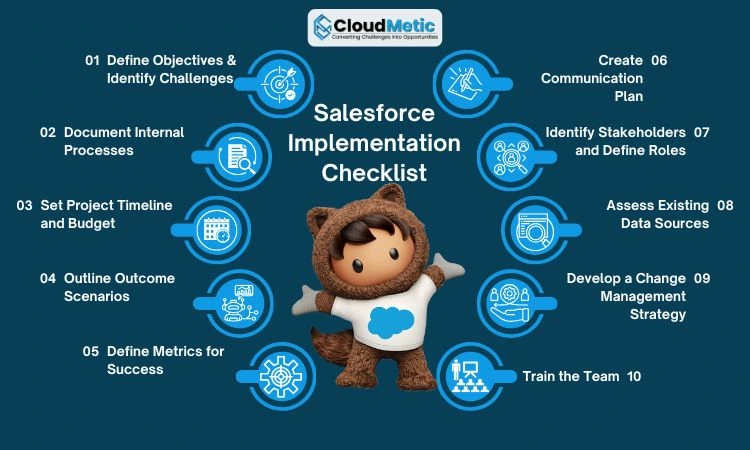
Salesforce Implementation Checklist: A Comprehensive Preparation Guide
When you are implementing Salesforce, you need to have an advanced Salesforce Implementation Guide that you need to be following:
The Salesforce Checklist in Tabular Summary
Let’s look at the Salesforce implementation in quick summarized form in a table format:
Step
Task
Description
1
Define Objectives & Identify Challenges
Clearly state business goals along with potential challenges.
2
Document Internal Processes
Map out the current processes & data flows.
3
Set Project Timeline and Budget
Create a simply realistic timeline & allocate resources.
4
Outline Outcome Scenarios
Assess various scenarios & develop contingency plans.
5
Define Metrics for Success
Establish different KPIs to measure implementation success.
6
Create Communication Plan
Develop a good communication strategy for keeping stakeholders informed.
7
Identify Stakeholders and Define Roles
Assign different roles & responsibilities to project team members.
8
Assess Existing Data Sources
Identify & evaluate data sources for the migration.
9
Develop a Change Management Strategy
Create a good plan for minimizing resistance and maximizing user adoption.
10
Train the Team
Provide comprehensive training through Salesforce features & usage.
Now, let’s look at this in a much detailed format:
Step 1: Define Primary Objectives and Identify Challenges
Define your business goals along with how Salesforce will help you achieve them.
Identify possible challenges and create solutions for fixing them.
Step 2: Record the internal processes and daily activities as well.
Define your current business procedures to find areas for improvement.
Identify how data flows across departments and services.
Step 3: Create a project timeline and budget.
Make a realistic project timeline with necessary milestones and dates.
Create a clear spending plan which involves licensing costs, installation fees, and training costs.
Step 4: Identify Various Scenarios for different outcomes
Do consider different types of scenarios, that of best-case and worst-case scenarios and what are their final results.
Develop a clear happening plan for addressing any type of challenges or risks.
Step 5: Define Metrics of Success
Set key performance indicators (KPIs) to monitor the success of your Salesforce implementation.
Track measures like higher sales, greater consumer happiness, and lower operating costs.
Step 6: Develop a Communication Plan and Channels.
Develop a communication plan for keeping stakeholders updated during the setup phase.
Set up channels for communication like email, meetings for teams, and tools for managing projects.
Step 7: Identify Salesforce Project Stakeholders and Define Roles
Identify all the major stakeholders, that includes project managers, project sponsors, developers, business analysts, IT administrators and end-users as well.
Clary defines each role and responsibility for every stakeholder and does ensure that everyone understands the role in each project.
This tactic can greatly enhance communication, decision making, and collaboration during the implementation process.
Step 8: Assess Existing Data Sources
Determine what sources of data need to be shifted to Salesforce, such as old databases, Excel spreadsheets, or alternative CRM platforms.
Evaluate the data’s accuracy, completeness, and integrity to guarantee an easy migration procedure. Clean and organize the data to increase its quality and accuracy.
Step 9: Develop a change management strategy
Create a complete change management plan to reduce opposition and promote user adoption.
It involves developing a communication plan to keep stakeholders informed, educating and helping users, and dealing with any issues or challenges that may occur.
Step 10: Train the team on the Salesforce ecosystem and it’s User-Interface
Provide users with full instructions on how to navigate the Salesforce interface, gain essential features, and efficiently complete their daily activities.
To guarantee effective learning, think about integrating online and classroom training, in addition to hands-on practice.
Also, create a dedicated support team to assist users with any inquiries or issues they may face.
Salesforce Implementation Strategies: Comparing Self-Managed and Managed Approaches
When you are into Salesforce Implementation you need to have implementation strategies and you should be comparing Managed vs Self-managed approaches:
Managed Approach
The managed approach has both advantages and disadvantages:
Advantages
Expertise: Using Salesforce consultants understanding can help to accelerate the setup procedure while decreasing risks.
Best Practices: Consultants can offer industry best practices and established methods, leading to improved effectiveness and efficiency in implementation.
Reduced Risk: Expert guidance can help mitigate possible problems and ensure a successful end.
Quick Time to Value: Organizations may reach a faster time-to-value by speeding the implementation process if they work with able consultants.
Drawbacks:
Higher Cost: Hiring a company that offers managed services can increase the total implementation cost.
Dependence on Third Parties: Hiring external consultants may reduce control over the undertaker’s timeline and decision-making.
Self-Managed Approach
The Self-managed approach also has its advantages and disadvantages. Here are these: nec ullamcorper mattis, pulvinar dapibus leo.
Advantages:
Cost-effective: In-house setup might be less expensive, especially for smaller firms that have prior Salesforce knowledge.
Greater Control: You have full control over the execution process and can make choices without depending on outside advisors.
Deeper Organizational Understanding: In-house teams are more mindful of the organization’s particular needs and may change their execution accordingly.
Drawbacks:
Implementation Technicalities: Self-implementation requires an in-depth knowledge of Salesforce and technical abilities, which might not be available within the company.
Time-consuming: Managing the implementation process within the company can take a while for complicated projects.
Risk of Errors and Delays: Without competent supervision, the procedure for implementation is more likely to be laden with errors and delays.
Common Challenges and Causes of CRM Implementation Failures
While Salesforce has multiple benefits, a great level of successful implementation requires effective planning along with execution. Some of the common challenges along with causes of the CRM implementation failures are:
No Clear Objectives
When a business has no clear objectives or goals, it becomes highly difficult to measure success and make informed decisions.
Insufficient User Training
Insufficient User Training: Lack of education could end up in resistance from users and low adoption rates.
Data Quality Issues:
Poor data quality may limit Salesforce’s effectiveness and decrease reporting accuracy.
Complex Integrations:
Connecting Salesforce with different platforms can be challenging and costly if not carefully designed.
Resistance to Change:
Change management is vital for reducing user resistance and achieving a smooth transition.
Step-by-Step Guide to Salesforce CRM Implementation Success
For ensuring the successful Salesforce implementation, follow these steps:
Define Goals and Evaluate Current Processes: Thoroughly define your objectives and look at current processes to find areas for improvement.
Plan and Resources: Create an extensive project plan, set up right cash, and gather an experienced implementation team.
Identify needs and select a partner: Define specific requirements and choose a valued Salesforce implementation partner who can guide the project.
Implement a CRM: Move data, setup Salesforce, provide extensive user training, and perform rigorous testing.
Monitor and Optimize: Monitor and improve key performance indicators, continually enhance the system, and provide going on user assistance.
Conclusion
Successful Salesforce implementation requires careful planning, ongoing support and execution. By following the steps that are in this guide, you can really maximize the advantages of Salesforce and really get to your business goals. Remember, a well-planned and handled Salesforce Implementation Consultant can greatly enhance your business’s effectiveness, output, and customer happiness.
Do You Need Help With Your Salesforce Implementation?
If you’re looking for experienced guidance and assistance for your Salesforce installation, think about collaborating with a Salesforce development company in the US. They can help you come to your business objectives through providing a range of services such as guidance, customization, integrating, and training.
Frequently Asked Questions (FAQs):
Q1. How long does a typical Salesforce implementation take?
Ans. A typical Salesforce implementation takes anywhere from 4 to 12 weeks, depending on the project’s complexity. Smaller businesses with fewer customizations may complete it faster, while enterprise-level setups with integrations, automations, and data migration require more time.
What are the phases of a Salesforce implementation project?
Ans. Salesforce implementation generally follows these key phases:
Discovery & Requirement Gathering
Planning & Design
Configuration & Customization
Data Migration
Testing (UAT)
Training & Deployment
Post-Implementation Support
Q3. What are the most common mistakes in Salesforce implementation?
A testimonial is a window into the experiences of our clients and partners who've worked with us.
Here, we share their feedback on how CloudMetic's solutions, approach, and support have made a real difference.
Salesforce · Reviews
Amara Singh
CTO, Nexus Corp
Salesforce transformed our sales pipeline. Real-time insights and AI-driven forecasts boosted revenue by 34% in Q2. The 360° view is a game changer.
James Park
VP, Omni Retail
The 360° view of our customers is unmatched. Integration was smooth, and the support team is world-class. Highly recommend for enterprise sales.
Clara Weber
Sales Ops, FinServe
Automation and workflow rules saved us 20+ hours weekly. Absolutely essential for our growth. The reporting dashboards are incredibly powerful.
Shopify · Reviews
Maya Chen
Founder, Bloom & Spice
Shopify made launching our DTC brand effortless. The app ecosystem is incredible, and our store looks gorgeous. Conversion rates are through the roof.
David Okafor
E‑com Manager, Volt Goods
Conversion rate increased 27% after switching to Shopify. Analytics and checkout are best-in-class. We've never looked back.
Elena Rossi
Creative Dir., Artisan Co.
The customization options are endless. We built a unique brand experience without writing a single line of code. Absolutely love the theme store.
ServiceNow · Reviews
Raj Patel
IT Director, CloudBridge
ServiceNow automated our entire IT service desk. Incident resolution time dropped by 60%. The platform is reliable and easy to configure.
Sophie Turner
VP Ops, Apex Systems
The platform is a game-changer for enterprise service management. Scalable, secure, and incredibly intuitive. Our ops team loves it.
Carlos Mendez
Security Lead, Zephyr
Governance and compliance are built-in. We streamlined risk management across all departments. A must-have for regulated industries.
AWS · Reviews
Taylor Kim
Cloud Arch., DataFlow
AWS gives us unmatched flexibility. From EC2 to Lambda, we deploy globally with zero downtime. The service breadth is incredible.
Nina Gupta
ML Engineer, Neurona
SageMaker and Bedrock accelerated our AI roadmap. The ecosystem is vast and deeply integrated. We ship models faster than ever.
Omar Hassan
CTO, CloudNova
Reliability and scalability are second to none. AWS is the backbone of our entire infrastructure. We sleep well at night.